For.A + LiveCut Integration

Connecting a For.A switcher

LiveCut logs every program cut from your For.A with frame-accurate timecode and exports editor-ready timelines for DaVinci Resolve and Final Cut Pro. Premiere can't read FCPXML, so LiveCut writes it a legacy FCP7 XML instead. There are two ways to connect — pick one, and you're cutting in a couple of minutes.
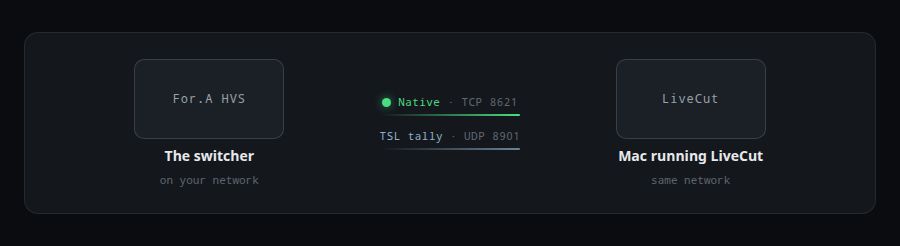
Connection Diagram

Connection Diagram

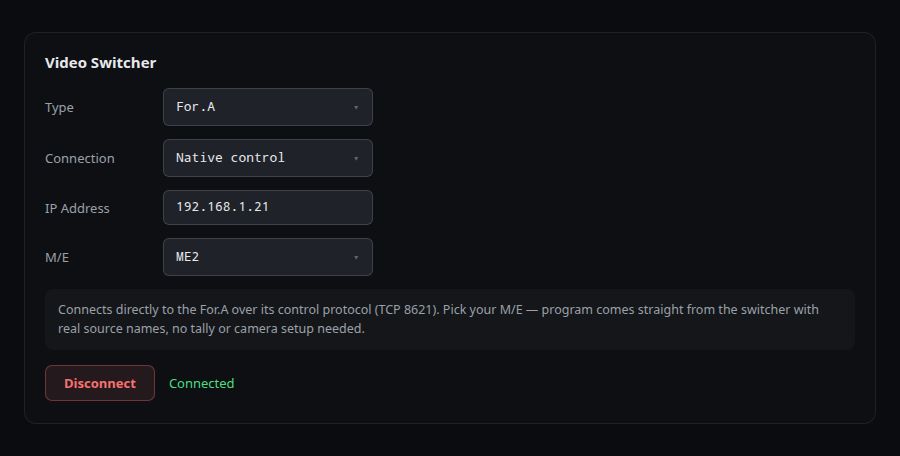
Method A — Native control

Native Control Panel
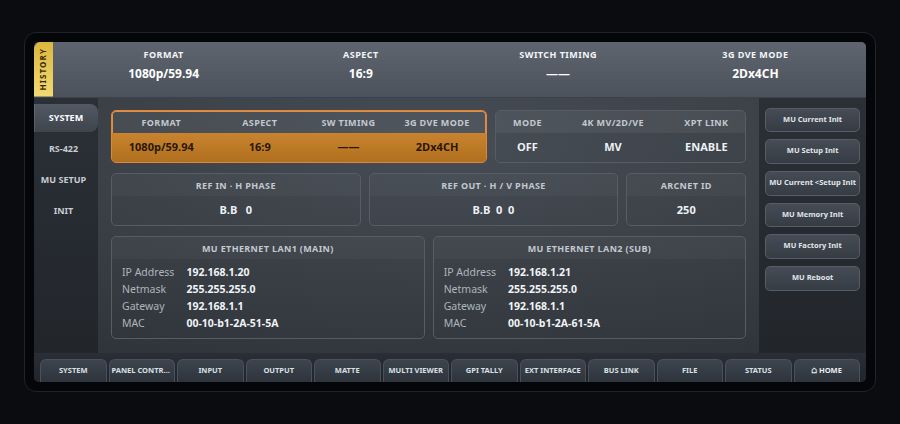
For.A System Network Screen

Method B — TSL tally

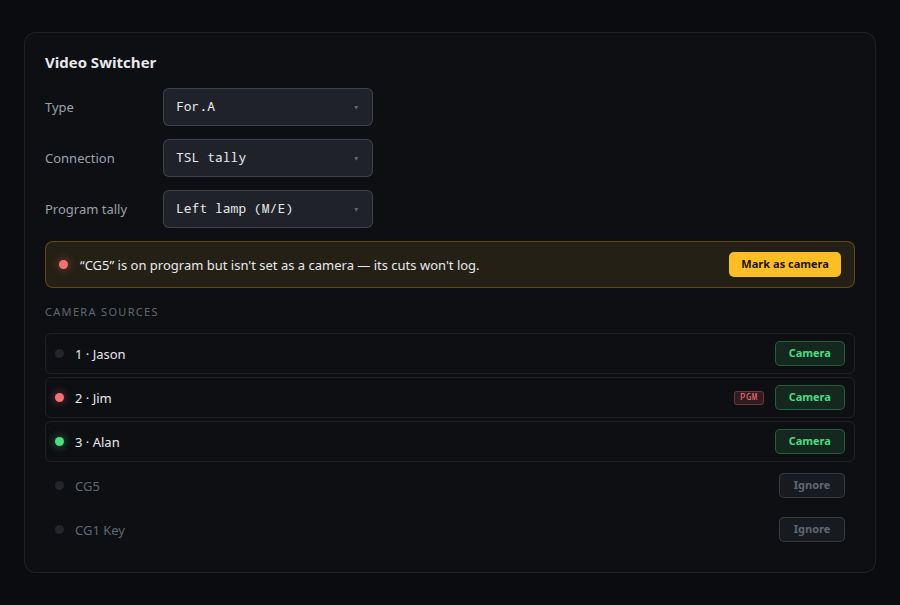
  1. Enable TSL output on the For.A switcher and define destination IP/UDP port.
  2. Set TSL version and label mode expected by LiveCut.
  3. Map TSL PGM/PVW tallies to LiveCut source IDs.
  4. Validate tally updates while switching CUT/AUTO on the hardware panel.
  5. Use TSL method when control is external but tally visibility is required.

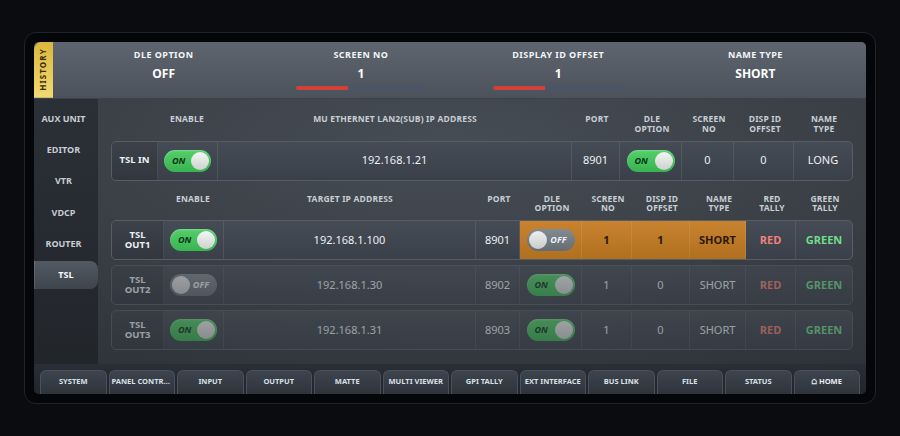
TSL OUT For.A switcher screen mock

For.A TSL Screen
TSL LiveCut Panel

TSL LiveCut settings mock

TSL panel shown above. Verify program tally mapping before going live.

Required — Both methods: Timecode

Use stable house/reference time so logs and exports stay frame-accurate.

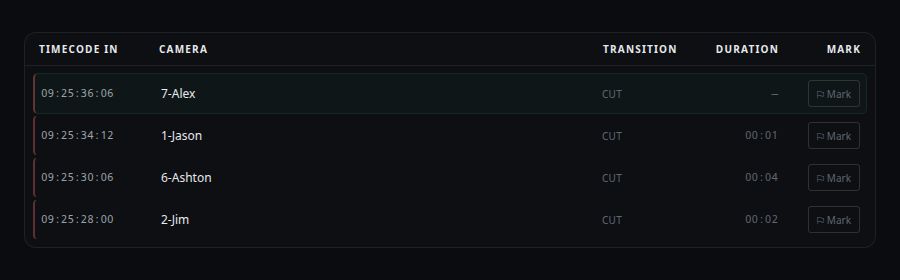
The workflow — Run a show & export

LiveCut Workflow Header
LiveCut Cut Log

If something's off — Troubleshooting

No Switcher Response

Verify IP/port, subnet, firewall rules, serial adapter profile, and control protocol.

Tally Mismatch

Re-check source mapping order and ensure PGM/PVW buses are not inverted.

Missing Log Entries

Confirm event stream is connected and that LiveCut has write permissions.

Export Issues

Validate destination path, available disk space, and active export profile.

For.A + LiveCut Setup FAQ — static documentation reference

For.A + LiveCut Integration

Connecting a For.A switcher

LiveCut logs every program cut from your For.A with frame-accurate timecode and exports editor-ready timelines for DaVinci Resolve and Final Cut Pro. Premiere can't read FCPXML, so LiveCut writes it a legacy FCP7 XML instead. There are two ways to connect — pick one, and you're cutting in a couple of minutes.
Connection Diagram

Connection Diagram

Method A — Native control

Native Control Panel
For.A System Network Screen

Method B — TSL tally

  1. Enable TSL output on the For.A switcher and define destination IP/UDP port.
  2. Set TSL version and label mode expected by LiveCut.
  3. Map TSL PGM/PVW tallies to LiveCut source IDs.
  4. Validate tally updates while switching CUT/AUTO on the hardware panel.
  5. Use TSL method when control is external but tally visibility is required.

TSL OUT For.A switcher screen mock

For.A TSL Screen
TSL LiveCut Panel

TSL LiveCut settings mock

TSL panel shown above. Verify program tally mapping before going live.

Required — Both methods: Timecode

Use stable house/reference time so logs and exports stay frame-accurate.

The workflow — Run a show & export

LiveCut Workflow Header
LiveCut Cut Log

If something's off — Troubleshooting

No Switcher Response

Verify IP/port, subnet, firewall rules, serial adapter profile, and control protocol.

Tally Mismatch

Re-check source mapping order and ensure PGM/PVW buses are not inverted.

Missing Log Entries

Confirm event stream is connected and that LiveCut has write permissions.

Export Issues

Validate destination path, available disk space, and active export profile.

For.A + LiveCut Setup FAQ — static documentation reference

For.A + LiveCut Integration

Connecting a For.A switcher

LiveCut logs every program cut from your For.A with frame-accurate timecode and exports editor-ready timelines for DaVinci Resolve and Final Cut Pro. Premiere can't read FCPXML, so LiveCut writes it a legacy FCP7 XML instead. There are two ways to connect — pick one, and you're cutting in a couple of minutes.
Connection Diagram

Connection Diagram

Method A — Native control

Native Control Panel
For.A System Network Screen

Method B — TSL tally

  1. Enable TSL output on the For.A switcher and define destination IP/UDP port.
  2. Set TSL version and label mode expected by LiveCut.
  3. Map TSL PGM/PVW tallies to LiveCut source IDs.
  4. Validate tally updates while switching CUT/AUTO on the hardware panel.
  5. Use TSL method when control is external but tally visibility is required.

TSL OUT For.A switcher screen mock

For.A TSL Screen
TSL LiveCut Panel

TSL LiveCut settings mock

TSL panel shown above. Verify program tally mapping before going live.

Required — Both methods: Timecode

Use stable house/reference time so logs and exports stay frame-accurate.

The workflow — Run a show & export

LiveCut Workflow Header
LiveCut Cut Log

If something's off — Troubleshooting

No Switcher Response

Verify IP/port, subnet, firewall rules, serial adapter profile, and control protocol.

Tally Mismatch

Re-check source mapping order and ensure PGM/PVW buses are not inverted.

Missing Log Entries

Confirm event stream is connected and that LiveCut has write permissions.

Export Issues

Validate destination path, available disk space, and active export profile.

For.A + LiveCut Setup FAQ — static documentation reference
>